
Simple Household Accounting with Privacy Protection
Overview
Bookeepa is a streamlined desktop application designed for personal household accounting, offering a minimalist yet fully functional interface. Its primary purpose is to help users track daily expenses and income with ease, making financial management accessible even for those without accounting experience. The app is tailored for individuals and small families seeking a straightforward way to monitor their finances without complexity.
It solves common pain points such as cluttered spreadsheets, forgotten transactions, and lack of visual insights. By organizing records by date and categorizing them through customizable tags—used as account titles—it enables users to gain a clear picture of spending habits. The app also supports data import and export, allowing users to preserve or transfer their financial history across devices.
Target users include home users, budget-conscious individuals, and anyone managing personal finances without professional tools. The software operates entirely offline, relying on Chrome’s local FileSystem for data storage, which enhances privacy and reduces dependency on cloud services. This makes it suitable for users concerned about data security.
While the developer, Bookeepa, is not described in detail, the app’s focus on simplicity and privacy suggests a user-first design philosophy. Real-world usage includes tracking grocery spending, utility bills, or monthly savings goals.
Key Features & Capabilities
- Simple Daily Record Tracking – Users can log income and expenses for each day with minimal effort, using a clean, intuitive interface that avoids clutter.
- Tag-Based Categorization – Transactions are grouped by user-defined tags, which act as account titles (e.g., groceries, rent, entertainment), enabling structured financial oversight.
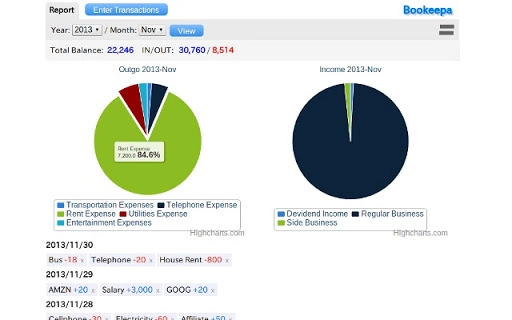
- Visual Insights via Pie Charts – The app displays spending breakdowns through pie charts, helping users quickly identify dominant expense categories.
- Data Import and Export – Users can import existing financial records or export their data for backup or analysis in other tools.
- Local Data Storage – All financial data is stored in Chrome’s local FileSystem, ensuring no external server access and preserving user privacy.
These features collectively support efficient personal finance management. For example, a user can record daily grocery purchases using a “groceries” tag, then review a pie chart to see how much of their monthly budget was spent on food. The import/export function allows migration from spreadsheets or legacy tools, ensuring continuity.
User Interface, Workflow & Performance
Bookeepa features a clean, uncluttered interface designed for ease of use. Navigation is straightforward, with a central dashboard displaying daily entries and visual charts. The layout prioritizes readability and quick access to core functions, minimizing the learning curve.
Workflow efficiency is enhanced by the app’s minimalistic design. Adding a new transaction involves selecting a date, entering the amount, choosing a tag, and saving—typically in under 15 seconds. The visual representation of data through pie charts allows immediate insight without complex analysis.
Performance observations are based on general software behavior patterns. The app is lightweight, with a file size of 1.2 MB, suggesting low resource consumption. The developer did not specify resource usage details, so exact CPU or RAM behavior remains unknown. Stability is expected to be high due to the app’s simplicity and reliance on a well-established platform (Chrome’s local FileSystem).
Compatibility & System Requirements
Bookeepa is compatible with both Windows and Mac operating systems. The software version is 1.2.3, and the installation size is 1.2 MB, indicating a compact footprint. This makes it suitable for devices with limited storage.
Exact system requirements were not listed. Compatibility information is limited to the operating systems mentioned. The app runs within Chrome’s environment, which may require a compatible version of Chrome to be installed. Users should ensure their system meets Chrome’s baseline requirements for optimal performance.
Platform compatibility is designed for desktop use, and no mobile or tablet support is indicated. The developer did not provide additional system requirements.
Pros and Cons
Pros
- Minimalist, user-friendly interface ideal for non-technical users
- Strong focus on privacy through local data storage
- Visual pie charts for quick financial insights
- Supports data import and export for flexibility
- Free to use with no hidden costs
Cons
- No cloud sync or cross-device access available
- Dependent on Chrome’s local FileSystem, which may limit accessibility if Chrome is unavailable
- Exact system requirements were not specified
- Limited customization options beyond tags and dates
- Offline-only functionality may hinder real-time collaboration
FAQ Section
Is Bookeepa compatible with both Windows and Mac?
Yes, Bookeepa is designed to run on both Windows and Mac operating systems.
How is my data stored and is it secure?
All data are stored in Chrome’s local FileSystem, which ensures that your financial information remains on your device and is not transmitted to external servers. This provides a high level of privacy and security.
Can I import or export my financial data?
Yes, Bookeepa supports both data import and export, allowing you to transfer records from other tools or back up your data.
Does Bookeepa require an internet connection?
The app functions entirely offline once installed. However, it relies on Chrome’s local FileSystem, so a working Chrome installation is required.
Is Bookeepa free to use?
Yes, Bookeepa is completely free with no premium tiers or hidden fees.
Final Thoughts
Bookeepa delivers a refreshingly simple yet effective solution for personal household accounting. Its minimalist interface, privacy-first design, and visual reporting make it a compelling choice for users who want to manage their finances without complexity. The ability to import and export data adds practical value, while local storage ensures peace of mind.
While it lacks cloud sync and advanced features, its focus on simplicity and security makes it ideal for individuals managing small budgets or tracking daily spending. It’s particularly well-suited for users who prioritize privacy and prefer offline tools.
For those seeking a lightweight, free, and secure desktop application to track household finances, Bookeepa stands out as a reliable option. Download Bookeepa now.







